Making a ball bounce cost me my sanity, but forced me to learn maths
Recently this video came up on my YouTube, I liked the idea of making satisfying simulations with code and had some post-exams free time on my hands so I thought I would try it for myself.
This was far more tricky that I thought it was going to be and also ended up being the first time I ever used high school maths in real life. I really enjoyed the project and learning, so here's a post to share them with my friends and cement my understandings.
I'm going to walk through the steps that it took to get the foundation of these simulations going, it's not perfect but the meat and potatoes are there. By the end you'll be able to simulate some basic physics and have something that looks like this.
For this simulation I'm going to be using pygame, pygame is a nifty little library that makes it really easy to run simulations like these ones and get visual stuff up on the screen super quick whilst using all that python syntax that we all know and love.
Here's some boiler plate code, to initialize pygame, draw a screen and define some colors. This isn't really too relevant or interesting but I've included it for transparency.
import pygame
import math

# init pygame
pygame.init()

# draw a 600 x 600 window
screen = pygame.display.set_mode((600,600))
Now we have pygame, and a basic screen but we now want to start drawing stuff on the screen. Let's create a new Class to draw the large circle that will contain our ball.
class DrawCircle:
    def __init__(self):
        self.center = (300,300)
        self.radius = 255
        self.width = 3

    def draw(self):
        pygame.draw.circle(screen,WHITE, self.center,self.radius,self.width)
Look how easy that was! We've now got a screen with a nice white circle.
Now come's the tricky (but interesting!) part of this project. We need to make the ball bounce. Easy right???....
Lets start by creating our BouncingBall object and initializing some variables
class BouncingBall:
    def __init__(self):
        self.x = 300
        self.y = 300
        self.velocity = [1, 2]
        self.radius = 15
        # Elasticity is the amount of energy the ball loses when it hits something
        self.elasticity = 0.9
        # constant for gravity
        self.gravity = 0.5
Going through the variables,
The x and y coordinates will "spawn" our ball in the middle of the screen.
The ball's velocity is represented as a list [1,2] and controls the speed and direction that the ball moves in, it'll change over time to reflect the ball's differing speeds and directions. The first value (1) is the initial horizontal speed (changing x-velocity) of the ball and the second value (2) is the initial vertical speed (changing y-velocity) of the ball.
This means that the ball will start moving downwards and to the right. There's no specific reason for this apart from the fact that it give's it that nice arc as it bounces from left to right.
Elasticity is the amount of energy the ball is going to retain after it collides with the edge's of the outer-circle. An elasticity of 0.9 means that every time the ball collides it loses 10% of it's energy. Giving it a realistic bounce.
And then we have a constant for gravity. Gravity acts as a constant downwards acceleration on the ball and makes the simulation look far more "real".
Simple enough!
Now for the real fun part! Let's get this bad boy moving!
    def move(self):
        # Apply gravity
        self.velocity[1] += self.gravity
        self.x += self.velocity[0]
        self.y += self.velocity[1]
Simple enough, we apply gravity to the y value of the velocity (thus pulling it down a bit) and then move the x and y values of the ball depending on the ball's current velocity in each of the directions.
But currently we don't check if the ball has hit the edge of the circle. So it's just going to move in one direction forever, let's change that and add some collision detection!
To figure out if the ball has collided with the edge of the circle we can imagine the ball's coordinate and the center of the big circle forming two points of a perfect right-angled triangle. We can then use Pythagoras theorem to calculate how far the ball is from the center and use this information to check if it's at the edge.
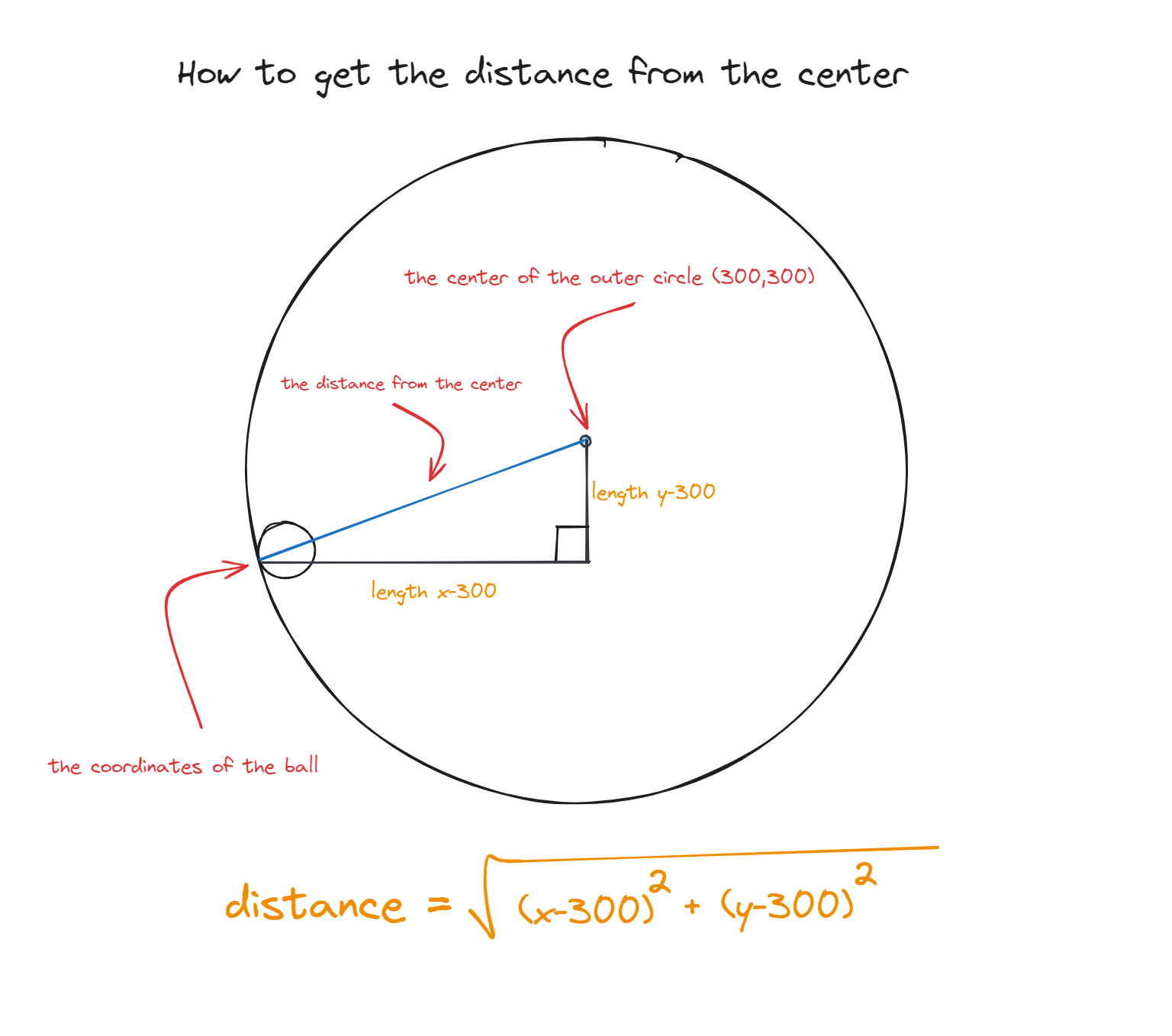
In code
if self.distance_to_center() + self.radius > 255:
    # The ball collided with the edge of the circle

def distance_to_center(self):
    # Pythagoras
    return math.sqrt((self.x - 300) ** 2 + (self.y - 300) ** 2)
Now that we know we have hit an edge we need to get (and thus calculate) that sweet, but so ever so elusive "bounce".
In order to do this we are going to have to go back to high school and refresh our knowledge of vectors.
A vector is a quantity that has both magnitude (length) and direction. In our case the ball's velocity is a vector because it describes how fast the ball is moving and the direction that it is moving in.
A normal vector is just a vector that's perpendicular (90 degrees) to a surface. In this case the normal vector is going to represent the direction from the point of collision towards the center of the circle.
But how do we calculate the normal vector?
We first have to find the vector pointing from the ball towards the center, we can do this quickly by subtracting 300 (recall that the center of the large circle is 300,300) from both the x and y coordinates of the ball. Which will get the same point on the opposite side of the circle. As seen in the image below.
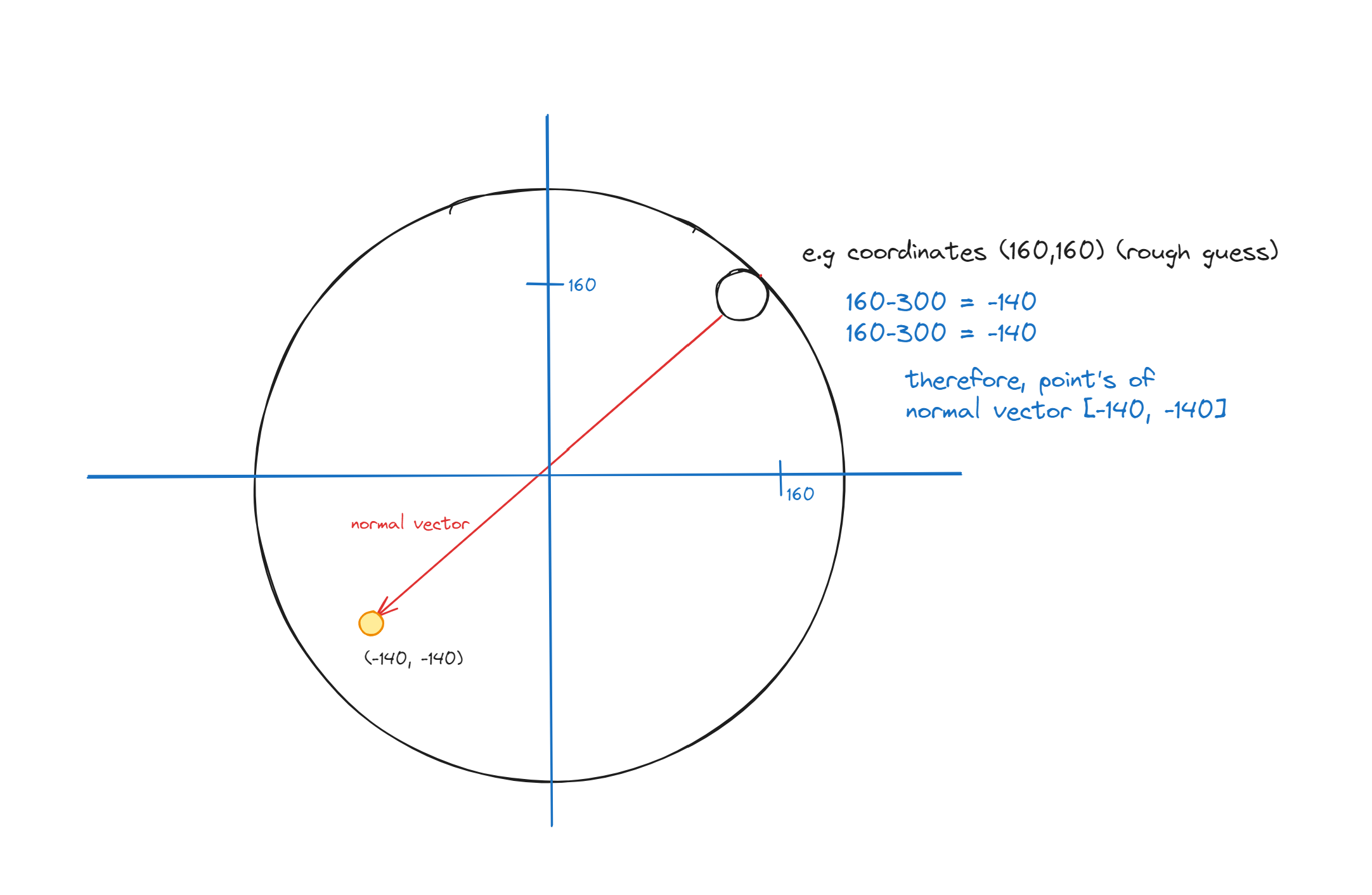
normal = [self.x - 300, self.y - 300]
Then once we have the vector pointing directly from the ball to the center we need to calculate the magnitude (length) of the current vector. This is the length from the ball to the center of the circle. Again we can use good old Pythagoras to do this.
normal_length = math.sqrt(normal[0] ** 2 + normal[1] ** 2)
But you may have realised a problem, this is gonna get really big really fast, and we don't actually care about the length, we only care about the direction so we can normalize this value. To make it more normal and avoid things like buffer overflow and let's us have more accurate, less exaggerated velocities.
We can do this by dividing each component of the vector by its magnitude again this will keep the overall direction of the vector the same, whilst managing the overall length.
normal = [normal[0] / normal_length, normal[1] / normal_length]
In fancy terms this is now called a unit vector because it has a length of 1.
Ok cool, now we have the normal vector, that wasn't so hard but how is this going to help us bounce? Intuitively we can't just make the ball exactly from the point and back, this isn't how bouncing works. When I throw a ball at an edge it doesn't just move straight back towards me, but how it bounces should be impacted by the angle and speed that the ball collided with the target.
To do this we first we need to calculate the dot product between the velocity and normal vectors, the dot product is a way to multiply two vectors that results in a single number. It combines the corresponding components of the vectors and then sums the products to do so.
In this scenario the dot product between the velocity and normal vector's tells us how much of the velocity is directed towards the collision point. A positive dot product means that the ball is moving towards the collision point, and a negative means it is moving away.
Here's an example that skip's normalization for simplicity sake.
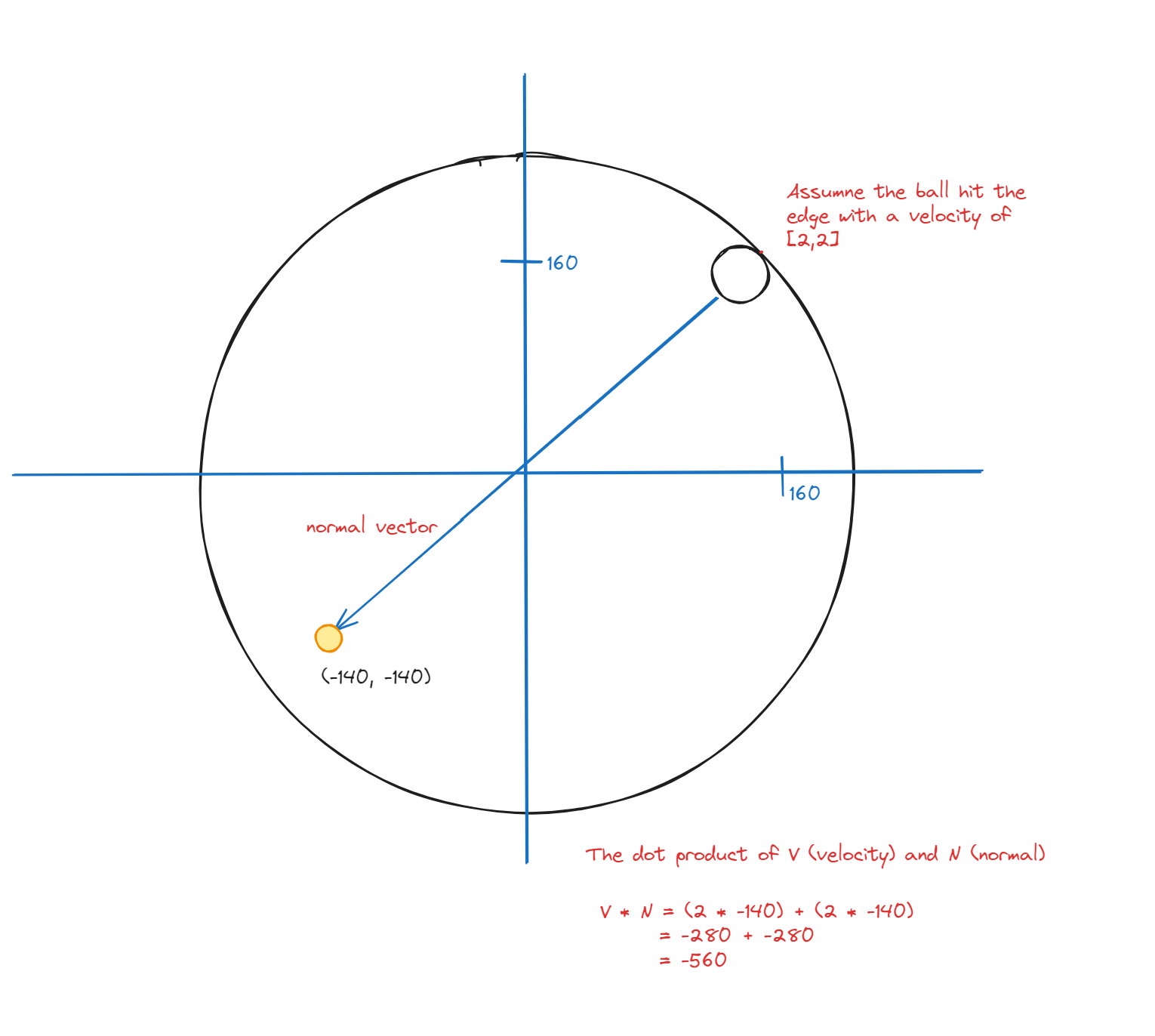
In the code this looks like so
dot_product = self.velocity[0] * normal[0] + self.velocity[1] * normal[1]
The dot product is going to determine how much of the ball's velocity is directed towards the center of the circle (the normal direction).
We now also need to reflect the new Velocity vector, to give the new direction that the ball is going to move in.
We can use a nice math trick here to reflect the velocity vector.
If we multiply the normal vector by twice the dot product the code essentially flips the component of the velocity vector that's parallel to the surface (represented by the normal vector). This effectively changes the direction of the ball based on the angle of impact.
In the code
self.velocity[0] -= 2 * dot_product * normal[0]
self.velocity[1] -= 2 * dot_product * normal[1]
We can't forget about adding elasticity, if we forget this the ball will just bounce forever, this isn't really realistic so we will multiply the ball's velocity by the elasticity constant to take away 10% of the balls speed every collision.
self.velocity[0] *= self.elasticity
self.velocity[1] *= self.elasticity
Now we have a bit of a problem. As the code currently stands the ball will get stuck inside the boundary and break everything. We can add a small amount of overlap to the ball to prevent it from getting stuck in the curvature of the boundary.
overlap = self.distance_to_center() + self.radius - 255
self.x -= normal[0] * overlap
self.y -= normal[1] * overlap
And that's all the maths and physics done. Easy peasy! Now to get things cooking let's quickly add a draw method to draw the bouncing ball to the screen.
def draw(self):
    pygame.draw.circle(screen, RED, (int(self.x), int(self.y)), self.radius)
Now create instances of the outer circle and bouncing ball and add a game loop.
circle = DrawCircle()
ball = BouncingBall()

# Game loop
while 1==1:
    # Move the ball
    ball.move()

    # Clear the screen
    screen.fill(BLACK)

    # Draw the circle and the ball
    circle.draw()
    ball.draw()

    # Update the display
    pygame.display.flip()

    # Cap the frame rate
    pygame.time.Clock().tick(60)
Done!
Here's the full code if you want to try it on your machine or play around with the values. Just pip install pygame if you haven't already and it'll work out the box :))).
import pygame
import math


# init pygame

pygame.init()

# draw a 600 x 600 window
screen = pygame.display.set_mode((600,600))
pygame.display.set_caption("BOUNCY BOUNCY!")

BLACK = (0,0,0)
WHITE = (255,255,255)
RED = (255,0,0)


class DrawCircle:
    def __init__(self):
        self.center = (300,300)
        self.radius = 255
        self.width = 3

    def draw(self):
        pygame.draw.circle(screen,WHITE, self.center,self.radius,self.width)

class BouncingBall:
    def __init__(self):
        self.x = 300
        self.y = 300
        self.velocity = [1, 2]
        self.radius = 15
        # Elasticity is the amount of energy the ball loses when it hits something
        self.elasticity = 0.9
        # constant for gravity
        self.gravity = 0.5

    def move(self):
        # Apply gravity
        self.velocity[1] += self.gravity
        self.x += self.velocity[0]
        self.y += self.velocity[1]

        # Check for collision with the boundary of the larger circle
        if self.distance_to_center() + self.radius > 255:
            # Calculate the normal vector at the point of collision
            normal = [self.x - 300, self.y - 300]
            normal_length = math.sqrt(normal[0] ** 2 + normal[1] ** 2)
            normal = [normal[0] / normal_length, normal[1] / normal_length]

            # Reflect the ball's velocity around the normal vector
            dot_product = self.velocity[0] * normal[0] + self.velocity[1] * normal[1]
            self.velocity[0] -= 2 * dot_product * normal[0]
            self.velocity[1] -= 2 * dot_product * normal[1]

            # Apply elasticity
            self.velocity[0] *= self.elasticity
            self.velocity[1] *= self.elasticity

            # Move the ball slightly outside the circle to prevent sticking
            overlap = self.distance_to_center() + self.radius - 255
            self.x -= normal[0] * overlap
            self.y -= normal[1] * overlap

    def distance_to_center(self):
        return math.sqrt((self.x - 300) ** 2 + (self.y - 300) ** 2)

    def draw(self):
        pygame.draw.circle(screen, RED, (int(self.x), int(self.y)), self.radius)

# Create instances
circle = DrawCircle()
ball = BouncingBall()

# Game loop
while 1==1:
    # Move the ball
    ball.move()

    # Clear the screen
    screen.fill(BLACK)

    # Draw the circle and the ball
    circle.draw()
    ball.draw()

    # Update the display
    pygame.display.flip()

    # Cap the frame rate
    pygame.time.Clock().tick(60)
Published on 2024-06-12